Unlike Digital Inputs which only transmit two values (On and Off, or High and Low), Analog Inputs are continuous sensors that send a range of values. Analog inputs are great for variable control of parameters like speed, volume, or saturation. The pictures below show how to connect a potentiometer and a photocell, typical Analog Inputs. There are a ton of different types of analog inputs. Some of the more complicated sensors are difficult to connect and use over MIDI, but the majority of analog sensors will work. For more detail, see the Analog Input tutorial on the Teensy website (or search for any of the million arduino resources on the topic).
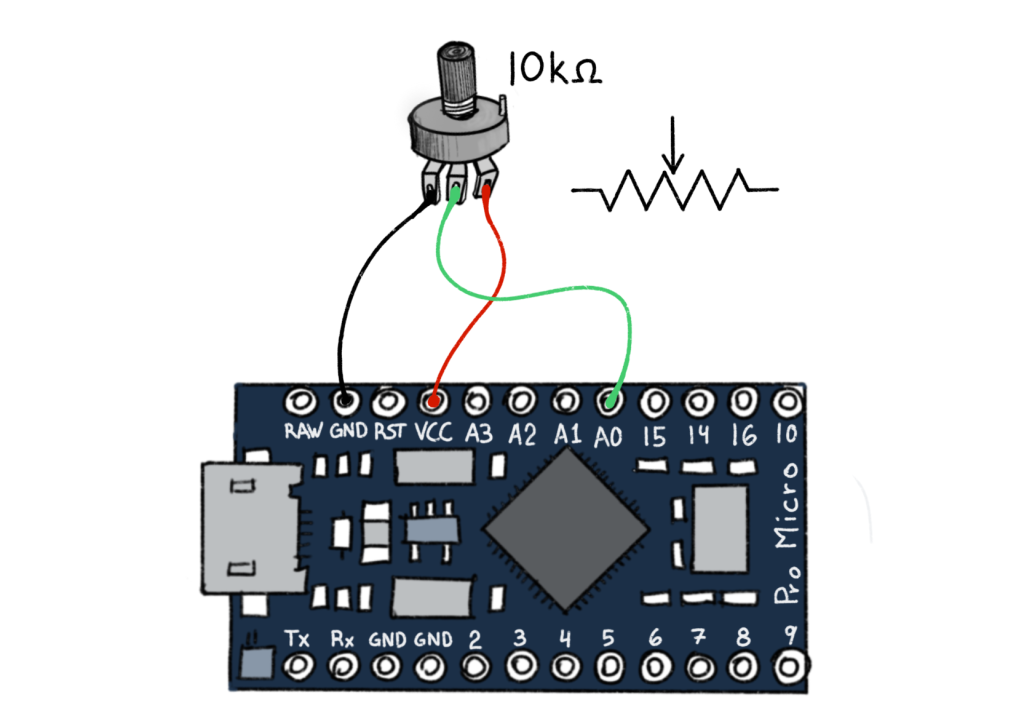
A potentiometer is a variable resistor that usually has three legs. Connect one outer leg to power and the other to ground. The middle leg connects to an Analog Input Pin, in this case A0. Here is the code for using an Analog input…
// Instantiate an array of CCPotentiometer objects that send
// MIDI CC messages when an analog sensor is changed (0-127)
CCPotentiometer potentiometers[]{
{ A0, 16}, // Analog pin (A0) connected to potentiometer, midi controller number (16)
{ A1, 17}, // Analog pin (A1)connected to light dependant resistor (LDR), midi ontroller number (17)}
};
Once again, we start by creating an object, this time it’s called CCPotentiometer and then we create a bunch of them by creating an array of potentiometers. Again, this initial code will stay the same, regardless of how many analog inputs you add! On the next line we specify a pin number, A0, and then tell the arduino what channel to send information on, in this case 16. So the arduino will send Midi control messages– a range of messages between 0-127, on channel 16.

The photocell does require a 10K resistor, which connects one of the legs to ground. The other leg is connected to power and the leg with the resistor is also connected to an Analog Input Pin, in this case A1. Now both of them together…

Expanding Analog Sensing
There are various analog sensor types with a variety of applications in electronics design, interactive installations and objects, instrument building, and automation.
Environmental Sensors
Environmental sensors monitor physical conditions such as light, temperature, motion, and humidity. These sensors are great for making real-time monitoring systems.
| Sensor Type | Example | Function |
|---|---|---|
| Temperature Sensor & Humidity Sensor | DHT22 | Measures temperature and humidity |
| Light Sensor | LDR | Monitors ambient brightness |
| Pressure Sensor | BMP280 | Detects air pressure changes |
Motion and Proximity Sensors
Motion and proximity sensors detect movement and spatial presence, making them ideal for systems that react to human interaction or object detection.
| Sensor Type | Example | Function |
|---|---|---|
| PIR Sensor | HC-SR501 | Detects human movement |
| Ultrasonic Sensor | HC-SR04 | Measures distance using sound waves |
| IR Sensor | Sharp GP2Y0A21YK | Senses nearby objects |
These sensors are frequently used in security systems, interactive installations, and robotics.
Touch and Force Sensors
Touch and force sensors detect physical contact or pressure, providing input for interactive installations, responsive displays, and haptic feedback systems.
| Sensor Type | Example | Function |
|---|---|---|
| Touch Sensor | Grove – Touch Sensor | Detects contact and near-touch interactions |
| Force Sensor | FSR | Measures applied pressure |
Sound and Vibration Sensors
Sound and vibration sensors respond to audio levels and physical motion, allowing for the creation of projects that react to sound or movement.
| Sensor Type | Example | What It Does |
|---|---|---|
| Microphone Sensor | KY-037 | Detects sound intensity |
| Vibration Sensor | SW-18020P | Captures vibrations and movement |
These sensors are frequently used in audio-responsive installations, musical interfaces, and motion-sensitive systems.
Position and Navigation Sensors
Position and navigation sensors track location, orientation, and movement, making them valuable for motion tracking, robotics, and interactive installations.
| Sensor Type | Example | Function |
|---|---|---|
| GPS Sensor | NEO-6M | Provides geolocation data |
| Gyroscope & Accelerometer | MPU6050 | Measures movement across six axes |
For further applications, see how these integrate with Arduino Nano or an esp32 for compact, location-based projects.
Other Sensors
There are other sensors that serve specific functions, from detecting gases to thermal imaging, expanding the scope to near infinite potentials.
| Sensor Type | Example | Function |
|---|---|---|
| Infrared Sensor | MLX90614 | Measures infrared radiation for heat detection |
| Gas Sensor | MQ-135 | Detects gas concentrations |
| Heart rate & Oxymeter | MAX30102 | Detects heart rate and oxygen levels |
These sensors are commonly used in environmental monitoring, industrial applications, and safety systems.